Disclosure: As an Amazon Associate, vicecitylocals.com earns from qualifying purchases. This does not affect the price you pay. We only recommend products we believe provide genuine value to GTA 6 streamers.
Best GTA 6 Streaming Setup Overall — 2026
Last Updated: September 2026
GTA 6 hits shelves on November 19, 2026 for PS5 and Xbox Series X|S — and when it does, Twitch and YouTube are going to be flooded with streamers pulling heists across Vice City. If you want to stand out from day one, you need a streaming setup that’s ready to go before launch day, not assembled in a panic after.
This is our complete, no-nonsense guide to building the best overall GTA 6 streaming setup. We’ve organized everything by category, picked the best gear for each, and broken it down into budget and premium tiers so you can build at whatever price point makes sense. Whether you’re streaming from a console (capture card required) or a gaming PC, this guide covers both paths.
The Two Streaming Paths: Console vs PC
Before we get into gear, you need to understand which path you’re on, because it determines what you need to buy.
Console Streaming (PS5 / Xbox Series X|S): Your console outputs HDMI video that needs to be captured by a separate PC running OBS. That means you need a capture card in addition to all the standard streaming gear. The chain looks like this:
Console → HDMI cable → Capture Card → Gaming PC (OBS) → Twitch/YouTube
Both PS5 and Xbox have built-in Twitch streaming, but it’s extremely limited — no custom overlays, no alert boxes, no chat integration on-screen, no scene switching. It’s fine for testing, but not for building a real channel.
PC Streaming: If you’re playing GTA 6 on PC (when the PC version releases), you don’t need a capture card. OBS captures your game directly. You still need a microphone, webcam, lighting, and optionally a stream deck.
| Feature | Console Streaming | PC Streaming |
|---|---|---|
| Capture Card Required? | ✅ Yes | ❌ No |
| Custom Overlays | ✅ Via OBS on PC | ✅ Direct in OBS |
| Alert Boxes | ✅ Via OBS | ✅ Direct |
| Setup Complexity | Higher | Lower |
| Equipment Needed | More gear | Less gear |
Category 1: Capture Card (Console Streamers Only)
If you’re streaming GTA 6 from a PS5 or Xbox, this is the single most important piece of gear you’ll buy. The capture card takes the HDMI signal from your console and feeds it into OBS on your PC.
Budget Pick: Elgato HD60 X
| Spec | Details |
|---|---|
| Capture Resolution | 1080p60 |
| Passthrough | 1080p60 |
| Connection | USB 3.0 |
| HDR | ✅ |
| VRR Passthrough | ❌ |
| Price | ~$150 |
The HD60 X is the entry point that most streamers should start with. It handles 1080p60 capture cleanly, passes HDR through to your TV, and works flawlessly with OBS. If you’re streaming at 1080p (which is still the Twitch standard), this card does everything you need.

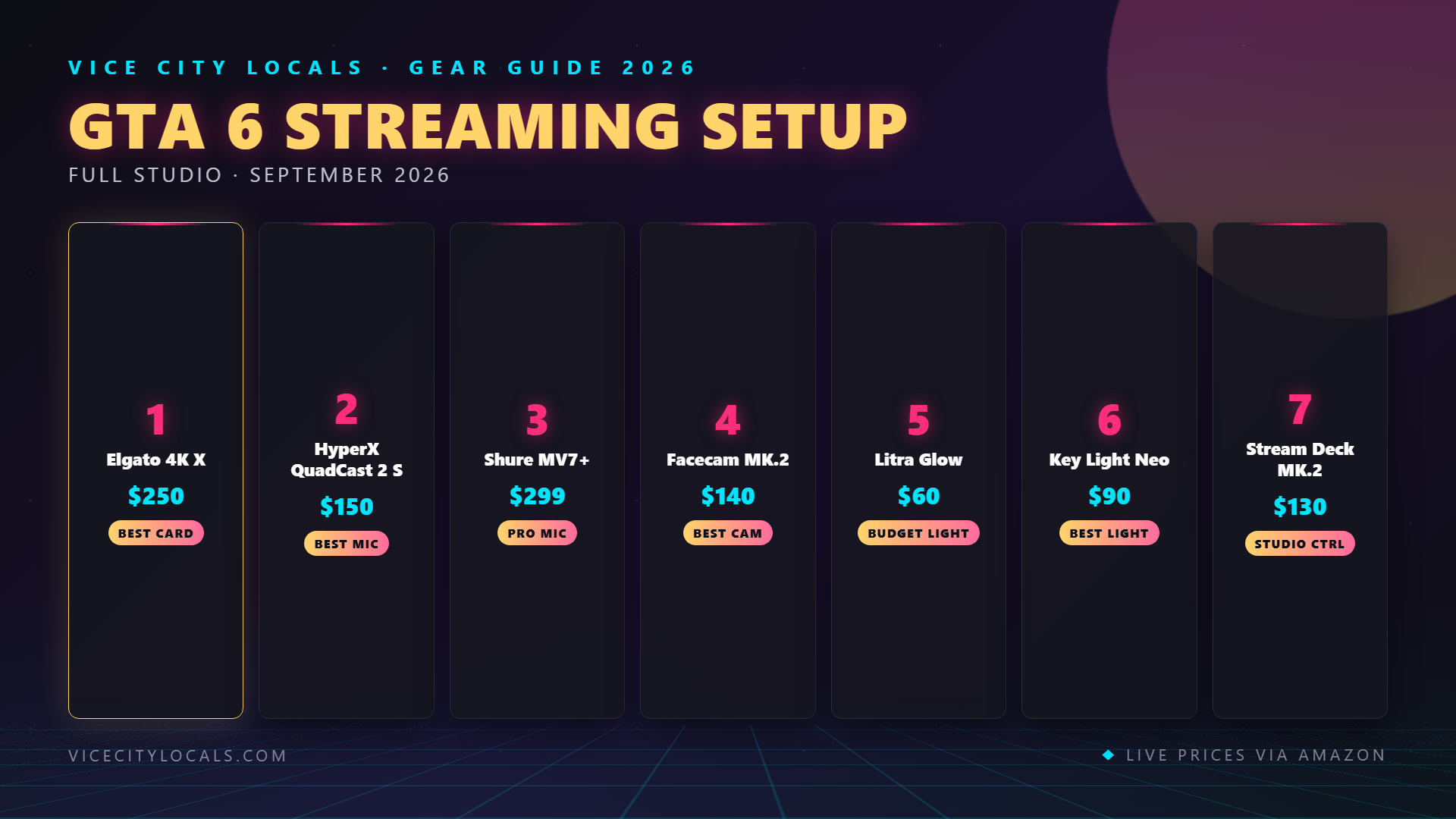
Premium Pick: Elgato 4K X
| Spec | Details |
|---|---|
| Capture Resolution | 4K144 |
| Passthrough | 4K144 |
| Connection | USB 3.2 |
| HDR | ✅ |
| VRR Passthrough | ✅ (Critical for Xbox) |
| HDMI | 2.1 |
| Price | ~$209 |
The 4K X is the card to get if you want to future-proof for GTA 6 at 4K, or if you’re on Xbox and need VRR passthrough. HDMI 2.1 means it can handle 4K120 signals from the Xbox Series X and PS5 Pro without breaking a sweat. This is our top recommendation for serious GTA 6 console streamers.

Category 2: Microphone
Audio quality matters more than video quality for viewer retention. Viewers will tolerate a 720p stream. They will not tolerate a stream where your voice sounds like it’s coming through a tin can.
Budget Pick: HyperX SoloCast
A surprisingly good USB condenser microphone for under $50. Tap-to-mute, compact footprint, and clean audio for the price. If you’re just starting out, this is where you should put your money.
| Spec | Details |
|---|---|
| Type | USB Condenser |
| Pattern | Cardioid |
| Price | ~$40 |

Mid-Range Pick: HyperX QuadCast 2 S
RGB lighting, four polar patterns, built-in shock mount, and a tap-to-mute sensor. This is the mic you’ll see on a lot of popular streams. Great sound, great looks, built-in pop filter.
| Spec | Details |
|---|---|
| Type | USB Condenser |
| Patterns | 4 (Stereo, Cardioid, Omnidirectional, Bidirectional) |
| Shock Mount | ✅ Built-in |
| Price | ~$120 |

Premium Pick: Shure MV7+
This is a USB/XLR hybrid mic — meaning you can plug it straight into your PC via USB now, and upgrade to an XLR audio interface later without buying a new mic. It’s the same family as the legendary SM7B used by podcasters and streamers worldwide, with auto-leveling DSP that keeps your volume consistent.
| Spec | Details |
|---|---|
| Type | USB/XLR Hybrid |
| Pattern | Cardioid |
| Auto-Leveling | ✅ |
| Price | ~$280 |

Category 3: Webcam
Your facecam is how viewers connect with you. GTA 6 streams run long — people are watching you react to chaos, not just watching gameplay.
Our Pick: Elgato Facecam
1080p60 at a fixed focus with a fast lens. It’s designed specifically for streaming, not for video conferencing, and it shows. The fixed focal length means it stays sharp even when you lean in close during an intense moment.
| Spec | Details |
|---|---|
| Resolution | 1080p60 |
| Focus | Fixed (f/2.4) |
| Sensor | Sony STARVIS |
| Price | ~$130 |

Want to use a real camera instead? The Elgato Cam Link 4K lets you connect any HDMI camera (Sony, Canon, Panasonic) to your PC as a webcam. The quality leap is enormous if you already own a mirrorless camera.
Category 4: Lighting
Good lighting makes a $50 webcam look like a $500 camera. Bad lighting makes a $500 camera look like a $50 webcam. This is not the place to cut corners.
Budget Pick: Logitech Litra Glow
A single LED panel that mounts on top of your monitor. TrueSoft technology delivers soft, natural-looking light. At ~$50, it’s the single best bang-for-your-buck upgrade you can make to your stream.
| Spec | Details |
|---|---|
| Brightness | 250 lux at 0.5m |
| Color Temp | Adjustable (2700K–6500K) |
| Mounting | Monitor clip |
| Price | ~$50 |

Premium Pick: Elgato Key Light Air
Wireless app control, 1400 lumens of brightness, and adjustable color temperature from 2900K to 7000K. Mount these on stands flanking your desk for proper two-point lighting. The app integration with Stream Deck is seamless.
| Spec | Details |
|---|---|
| Brightness | 1400 lumens |
| Color Temp | 2900K–7000K |
| Control | Wi-Fi app / Stream Deck |
| Price | ~$130 each |

Category 5: Stream Deck
Our Pick: Elgato Stream Deck MK.2
15 customizable LCD keys that let you switch scenes, trigger sounds, adjust lighting, launch clips, post to social media — all with a single tap. If you’re streaming GTA 6 solo (no mod), a Stream Deck is what lets you run a professional-looking broadcast by yourself.
| Spec | Details |
|---|---|
| Keys | 15 LCD |
| Customization | Unlimited profiles |
| Price | ~$130 |

Budget vs Premium: The Full Build Breakdown
Here’s what a complete GTA 6 streaming setup looks like at two price points for console streamers:
The Budget Build (~$600)
| Component | Product | Price |
|---|---|---|
| Capture Card | Elgato HD60 X | $150 |
| Microphone | HyperX SoloCast | $40 |
| Webcam | Elgato Facecam | $130 |
| Lighting | Logitech Litra Glow | $50 |
| Stream Deck | Elgato Stream Deck MK.2 | $130 |
| HDMI 2.1 Cable | (Various) | $15 |
| Boom Arm + Accessories | (Various) | $85 |
| Total | ~$600 |
The Premium Build (~$1,200)
| Component | Product | Price |
|---|---|---|
| Capture Card | Elgato 4K X | $209 |
| Microphone | Shure MV7+ | $280 |
| Webcam | Elgato Facecam + Cam Link 4K | $230 |
| Lighting | 2× Elgato Key Light Air | $260 |
| Stream Deck | Elgato Stream Deck MK.2 | $130 |
| Boom Arm + Cables | (Various) | $91 |
| Total | ~$1,200 |
What to Buy First If You’re on a Tight Budget
If you can’t buy everything at once, here’s the priority order:
- Microphone — Audio is the #1 factor in viewer retention
- Capture card (console only) — Without it, you can’t stream properly
- Lighting — Bigger visual upgrade than a better webcam
- Webcam — Only matters once your lighting is sorted
- Stream Deck — A luxury, not a necessity
FAQ
Do I need a capture card if I’m streaming from PC? No. PC streamers capture gameplay directly in OBS without any additional hardware. Capture cards are only needed when capturing an external HDMI source like a console.
Can I use the built-in console streaming for GTA 6 launch day? You can, but we don’t recommend it for building a channel. PS5 and Xbox built-in streaming lacks overlays, alerts, and scene switching. Use it as a backup only.
Is 1080p60 or 4K better for streaming GTA 6? For Twitch, 1080p60 at 6000 kbps is still the practical standard. 4K streaming requires massive upload bandwidth and most viewers won’t see the difference on smaller screens. Capture in 4K, but stream at 1080p.
Do I need two monitors to stream? Strongly recommended. One for gameplay, one for OBS/chat/stream controls. Trying to manage everything on one screen is a nightmare during live GTA 6 chaos.
Will my current PC handle streaming GTA 6 while running OBS? If you’re console streaming, your streaming PC doesn’t need to be powerful — it just needs to run OBS and encode. If you’re PC streaming (playing and encoding on the same machine), you need a solid GPU (RTX 3060 or better) for smooth performance.
Final Thoughts
GTA 6 is going to be one of the biggest streaming events in gaming history. The streamers who show up on launch day with a polished setup will have a massive advantage in building an audience. Start building now, prioritize audio first, and don’t wait until November to get your gear sorted.
Ready to build your setup? Start here:
- 🎮 Elgato 4K X Capture Card
- 🎙️ Shure MV7+ Microphone
- 📷 Elgato Facecam
- 💡 Elgato Key Light Air
- ⌨️ Elgato Stream Deck MK.2
Build it piece by piece, and you’ll be ready to dominate Vice City on stream when November 19th arrives. 🔥
Related GTA 6 Guides
- Best Capture Cards for GTA 6
- Best Microphones for GTA 6 Streaming
- Best Lighting for GTA 6 Streaming
- Best GTA 6 Setup for Xbox — Complete
- Best GTA 6 Setup for PS5 — Complete
Want GTA 6 news the second it drops? Join the Locals — our free newsletter. No spam, unsubscribe anytime.